Tennis tracker for Apple Watch
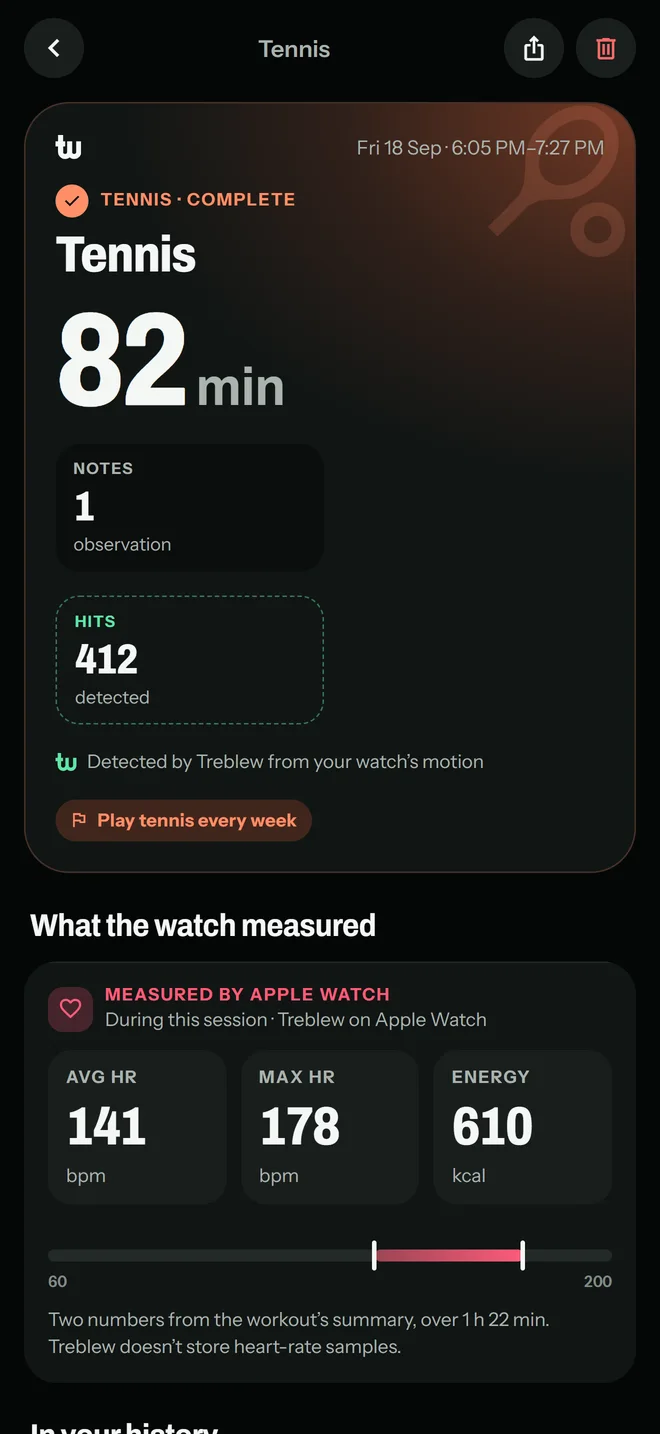
Your Apple Watch detects and counts each hit as you play. After the session, your iPhone names each stroke, forehand, backhand or serve, from your watch’s motion, and replays it in 3D. How well it names strokes varies from player to player, and you can correct any.
On the App Store. Free to download, with Treblew Pro inside.

How it works
- Tell Treblew which wrist your watch is on and which hand you play with. Hits read best with the watch on your racket wrist.
- Calibrate once on your Apple Watch: a few of each stroke, so Treblew learns how you play.
- Start a tennis session on your watch and play. It detects each hit as you go.
- On iPhone, see your hits and every stroke named, each with a 3D replay.
Strokes Treblew names
- Forehand topspin and forehand slice.
- Backhand topspin and backhand slice.
- Serve.
A stroke Treblew isn’t sure of is left unnamed. On a stroke’s replay, Treblew asks if it named it right; answer No and choose the right stroke.
A 3D replay of each stroke
Your wrist’s path around the contact, drawn on iPhone from the watch’s motion. View it from behind, the side or the top, and turn it with your finger.
Every rally, as a clip
- Hold your iPhone sideways, the court in view from behind the baseline.
- Treblew films the session and cuts a clip of every rally, found by the sound of its hits.
- Each point in a clip is its own row, with the whole clip a tap away.
- Play a clip at quarter speed, save it to Photos or share it. The clips stay on your iPhone.
What you need
- An iPhone with iOS 17 or later.
- An Apple Watch with watchOS 10 or later.
Free and Treblew Pro
Recording a tennis session is free on iPhone and Apple Watch. Stroke detection on Apple Watch and rally recording are part of Treblew Pro, and the Free plan includes one try of each.
Questions
Can Apple Watch count my tennis hits?
With Treblew, yes. The watch detects each hit from its motion during a tennis session and counts it as you play, with your iPhone nearby or not.
Does Treblew know a forehand from a backhand?
After the session, your iPhone names each stroke: forehand topspin, forehand slice, backhand topspin, backhand slice or serve. The names are estimated from the watch’s motion, matched to calibration strokes you record once. How well it names strokes varies from player to player, and you can correct any of them.
Do I have to calibrate?
Yes, once, before your first session with stroke detection. The watch asks for a few of each stroke, one at a time, and you can add more later.
Can Treblew film my rallies?
Yes, on iPhone. Hold it sideways with the court in view from behind the baseline, and Treblew films the session and cuts a clip of every rally, found by the sound of its hits. Each point in a clip is its own row, with the whole clip a tap away. The clips stay on your iPhone.
Is it free?
Recording a tennis session on iPhone and Apple Watch is free: time, heart rate and energy. Stroke detection on Apple Watch and rally recording are part of Treblew Pro, and the Free plan includes one try of each in tennis.
Treblew is free to download on the App Store.